Another day, another scam. And this is a sneaky one.
Cyber criminals are getting smarter. This recent malware threat is unusually smart. It impersonates a highly trusted brand name to get a foot in the door. Targets receive a convincing looking email that appears to come from a widely used e-signature platform. Attached to the email is a blank image that’s loaded with empty svg files, which are carefully encoded inside an HTML file attachment (stay with us here). In short, it’s very clever and it’s tricking its way past a lot of security software.
That puts businesses like yours at risk. Because code within the image sends people to a malicious URL. Open the attachment and you could unwittingly install malware onto your device – or even your network – which risks exposing your data and leaving you open to a ransomware attack.
Recently, there’s been a wave of HTML attachment attacks on small and medium sized businesses, so it’s clear that companies need to take action to stay ahead of the criminals. If you use software to sign documents electronically, double-check that emails are genuine before opening any attachments. There’s a reason why the criminals have chosen to impersonate a trusted name. Taking things a step further, you could block all emails with this type of attachment, to prevent employees from being exposed to scam emails in the first place.
If you’d like any further advice, or help implementing extra security measures, get in touch.
It seems that Gen Z and even some Millennial employees are less tech savvy than many employers might expect. It’s an assumption that’s leading to a sense of ‘tech shame’. Younger workers may have grown up using Snapchat, TikTok and Minecraft, but they’re not always equipped with the skills they need to adapt to the workplace.
A recent study has found that one in five employees aged 18 to 29 feel judged when they encounter technical issues at work. That’s compared to just one in 25 employees aged 40 or over.
The solution may lie in providing better training, not just for younger colleagues and first-jobbers, but for the whole team. Some Gen Z workers may have started their careers during the pandemic. That means they will never have experienced anything other than a digital working environment. Especially if they work remotely or in a hybrid role. As well as fixing any skill gaps there may be, whole-team training can provide a much-needed confidence boost for young employees.
Another consideration is the provision of tools and devices your team has access to – especially if they’re working remotely. Younger workers with less available income to spend on home office equipment may be less likely to speak up if they’re struggling. Simply checking in with employees – particularly if they’re not in the office – can make a big difference to their engagement, productivity, and confidence. If there are any issues, big or small, find a way to put them right, and you’ll notice a positive shift in the whole business.
If you’d like any advice about tech shame or help with training, boosting efficiency or sourcing equipment, we’re here when you need us. Just get in touch.
Countless employers still don’t trust their people to do their best work unless they’re physically in the office. But while managers may be struggling to adjust to our new hybrid world, this perception is a long way from the truth.
Research from around the world reveals that greater flexibility from remote and hybrid working often results in a major boost to productivity. Yet still some firms are bringing back an office-only policy. Employers may be grappling with the fallout of the last few years and hoping that a return to the office will result in a post-pandemic productivity boost. But seeing as hybrid workers show improved morale, greater creativity and better collaboration (compared with pre-pandemic levels), this could be a big step in the wrong direction.
Big Brother will never be popular
Some businesses have increased their employee monitoring to try and track performance. But this is often perceived as a Big Brother tactic that ends up having the opposite effect – a drop in productivity, a lack of trust, demoralized teams, and a greater feeling of ‘us and them’. All businesses need to understand how they are performing and decide which metrics give the best insight into productivity. But this has to be done in a way that doesn’t leave employees feeling like cogs in a machine.
So what’s the answer?
There is some clear advice for building a productive and successful hybrid environment:
Encourage people to work in the way that’s best for them
Find the right ways to measure performance – without people feeling like they’re constantly being watched
Automate repetitive tasks to free up your team’s creativity
And provide everyone with the tools and tech they need to do their job properly. That could include choosing the right devices, using communication tools that aid collaboration, and making the right connectivity choices.
We can help with all of this.
So if you’re having trouble adjusting to a hybrid world, get in touch – we’re here to help.
Phishing continues to be one of the most common security threats today, and anyone who uses digital communication channels can become a victim. Registered investment advisors (RIAs) and financial advisors who primarily rely on emails should be extra vigilant and take steps to create a secure environment for transmitting sensitive information.
Microsoft’s first contact safety tip can protect your RIA firm by enabling you to identify suspicious emails and take action before it’s too late.
What is Microsoft’s first contact safety tip?
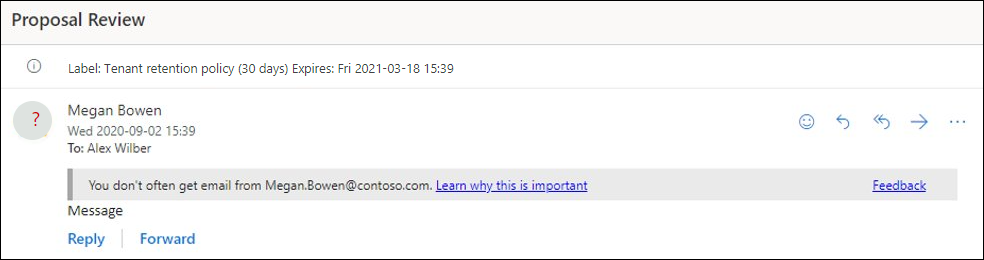
If you use Outlook as your email platform, then you may have encountered the following warning messages.
You don’t often get email from [sender].
Some people who received this message don’t often get email from [sender].
These are examples of Microsoft’s first contact safety tip, which is designed to alert you to emails from unknown or suspicious senders. Whenever you receive a message from an unfamiliar email address, or if it’s been some time since the last one, these safety tips will appear. If the message has multiple recipients, you’ll be notified when most of the recipients don’t usually receive messages from the sender.
How can Microsoft’s first contact safety tip help keep your RIA safe?
Enabling Microsoft’s first contact safety tip can help you recognize potential phishing attempts and prevent the misuse of confidential information. If a suspicious email arrives in your inbox, you can take action by deleting it or reporting it to your IT team for further investigation. This feature may also help you identify malicious senders who are attempting to impersonate your clients or colleagues.
Additionally, using this feature can encourage employees to practice safe online behavior. Safety tips can remind advisors and staff to be more cautious when opening emails or responding to messages.
This level of vigilance can go a long way in protecting your RIA firm’s data and ensuring compliance with industry regulations. In fact, turning on the first contact safety tip feature improves your Microsoft Secure Score, which is one of the key metrics that regulators use to assess an organization’s security posture.
What are the other benefits of enabling Microsoft’s first contact safety tip?
Apart from beefing up your RIA firm’s security, enabling Microsoft’s first contact safety tip feature helps you stay organized by making it easier to identify emails from regular contacts. This can be especially useful when you are dealing with a large volume of emails on a daily basis and need to prioritize accordingly.
Additionally, safety tips can reduce the amount of time spent on identifying and responding to phishing attacks. By having a quick reference tool that can alert you to suspicious emails, you can take appropriate action much faster.
Finally, safety tips help increase employee productivity by reducing distractions caused by phishing emails and other security threats. By freeing up their time, this feature lets advisors and staff focus on their core tasks and maximize efficiency.
Microsoft’s first contact safety tip is a simple yet powerful security feature that can help your RIA stay safe from cyberthreats. By taking the time to configure this setting, you can rest assured that your firm is better protected against malicious actors and their attempts to access confidential information.
If you use Outlook and have a Microsoft subscription but don’t receive these safety tips, ask your IT team or contact our experts at RIA WorkSpace to enable the feature right away. This small step can save your RIA firm from unnecessary security headaches and ensure the safety of your data.
As a registered investment advisor (RIA), you’re completely aware that managing your data is essential to your success. To accomplish this, you need a system that can securely store information and help you quickly locate documents when needed. Two popular options for RIAs and financial advisors are Laserfiche and SharePoint, but which is the better option for your needs?
Let’s take a look at what each solution offers and how they compare.
Laserfiche
Laserfiche is an enterprise content management (ECM) platform designed for organizations that need to store and manage large amounts of data. It has a wide range of capabilities, including document management, workflow automation, and optical character recognition (OCR). The platform is also highly secure, offering built-in encryption, role-based access, and records management tools to support regulatory compliance.
In addition, Laserfiche offers integration with key customer relationship management and wealth management systems, making it a great choice for RIAs that handle data from multiple sources. While this leading ECM platform does require a significant investment in setup and training, it can provide meaningful savings in the long run by streamlining processes and eliminating various manual tasks.
SharePoint
Microsoft’s ECM solution SharePoint is a versatile, secure, and powerful platform that enables organizations to store, organize, and share data. It also provides collaboration tools that support your workflows and make it easier for teams to communicate and coordinate.
SharePoint offers many of the same features as Laserfiche, including document management, workflow automation, and secure file storage. On top of that, the platform comes with robust search capabilities, flexible sharing options, and refined version control features, which make it a breeze to track changes and maintain document integrity. These features are especially useful for RIAs in ensuring the accuracy of client information and accelerating compliance audits.
While SharePoint is a bit more complex to set up than other content management solutions, its high degree of customization, intuitive user interface, and easy integration with Microsoft products and services make it an attractive option for many RIAs.
Which ECM platform is better for your RIA?
Both Laserfiche and SharePoint offer a variety of features that can help you manage your data and streamline your workflows. However, determining the right solution for your RIA or financial advisor firm largely depends on the size and scope of your operations.
If your RIA firm constantly deals with large data volumes, Laserfiche may be the best option since it offers a highly comprehensive set of capabilities and impressive security. But if you’re a firm with 5–25 employees, you may be better served by SharePoint, since it’s easier to set up and offers a more intuitive user interface.
The extensive features of Laserfiche may also be overkill for a small RIA, since the platform can require significant setup and training before users can realize its full potential. In this case, SharePoint may be more suitable since it is easier to implement and provides a smoother learning curve.
Additionally, if you already use other Microsoft solutions or prefer to stay within the Microsoft ecosystem, then SharePoint is the obvious choice. It integrates seamlessly with other Microsoft technologies, allowing you to leverage existing investments and make the most of your resources.
Ultimately, you must evaluate the platforms carefully to determine the one that best fits your firm. Consider your RIA’s size, operations, and budget to make an informed decision. With the right ECM solution, you can streamline processes and ensure that your data remains secure, accessible, and compliant.
Our specialists at RIA WorkSpace can help you understand the nuances of each ECM platform and assess which one is best for your RIA. Contact us today.
Everything was winding down from the busy holiday season. Shanice had received many gift cards from friends and family, but she noticed that some of them did not have the amounts written on the back, so she turned to the web to check the balance.
She typed “gift card balance checker” into the search engine and scrolled through the results. She ended up choosing a website that offered free gift card balance checks. After clicking on the link, she was taken to a legitimate-looking site.
She was prompted to enter the card number and security code. As she entered the information, Shanice had an uncomfortable feeling, so she decided to check some reviews on the website to make sure it was legit.
She soon found that the website had very few reviews. After scrolling through the results, she found some negative comments that said the website was a scam, and that by entering the card information, the scammer would have accessed the remaining gift card balance.
Did you spot the red flags?
Even if it appears on a search result, unknown websites with free offers should be treated with caution.
She did not check the back of the gift card to see if it provided any instructions on how to check the balance.
Shanice should have checked the reviews first, before entering information on the website.
What you should know about this scam
Only use official websites to check gift card balances. The websites of the gift card brand often include ways to check the balance.
Research the website first. If there are no reviews or if there are signs of a scam, do not enter the website or enter any personal data.
According to consumer reports, $233 million was lost to gift card scams in 2021 and the scammers have certainly not slowed down this past year.
Cybersecurity insurance is becoming an increasingly common requirement for organizations of all types and sizes. And for good reason — it’s a safety net at a time when data breaches are incredibly costly and disruptive to both business and client.
Registered investment advisory (RIA) firms are no exception. As the data held by RIA firms continues to become more valuable and complex, many of their clients feel compelled to require RIAs to have some form of cybersecurity insurance to keep client information and assets safe.
To ensure your RIA firm is adequately protected, it’s essential to understand what cybersecurity insurance is, what it typically covers, and why it’s crucial.
What is cybersecurity insurance?
Cybersecurity insurance, also known as cyber liability insurance or cyber insurance, is specifically designed to protect businesses from losses related to cyberattacks, data breaches, and other IT-related incidents. In exchange for a monthly or quarterly fee, the insurance provider will cover the costs associated with responding to and recovering from these incidents, up to the policy limit.
While most RIAs already maintain some form of professional liability insurance, such as errors and omissions insurance, these policies generally do not extend to cyber incidents. This makes cybersecurity insurance a vital part of your RIA firm’s risk management strategy.
What does cybersecurity insurance cover?
Depending on the price and type of your cybersecurity insurance policy, you can expect coverage for the following expenses if your IT assets are physically destroyed or stolen:
Recovering and restoring altered or stolen data
Repairing or replacing damaged or compromised IT systems
Investigating and hiring forensics experts
Notifying affected customers, vendors, and other parties
Making cyber extortion payments
Paying legal fees resulting from privacy violations
Restoring identities of clients whose personally identifiable information (PII) was compromised
Cybersecurity insurance coverage varies per provider. Some insurers cover only first-party losses, while some include third-party losses, so always read the fine print before deciding on a policy.
Also, keep in mind that many policies do not cover preventable security issues caused by humans. This includes instances such as employees clicking on malicious links, IT admins failing to properly patch software, and other careless mistakes. It therefore pays to invest in staff training and a strong security strategy to ensure these problems don’t arise.
RIAs are especially vulnerable to cyberattacks. Not only does your firm store and manage vast amounts of sensitive financial data for your clients, but you often handle large sums of money. As a result, you are more likely to be targeted by hackers and cybercriminals looking for financial gain.
In addition, regulatory bodies like the Securities and Exchange Commission have moved to enforce stricter standards for how data is stored and safeguarded. This means that you could face serious penalties for not meeting these requirements.
By investing in a comprehensive cybersecurity insurance policy, you can rest assured that you’re taking the necessary steps to protect your firm and your clients from the costly consequences of a cyber incident.
However, it’s important to note that insurance companies now require more detailed documentation from RIAs about their IT setup before offering coverage. This can include everything from a detailed inventory of your hardware and software to information about the security measures you are currently implementing. In some cases, they may even ask for your Microsoft Secure Score.
For these reasons, it’s highly recommended that you enlist the help of an IT professional to complete all documentation required for your cybersecurity insurance. Your IT partner can also help beyond ensuring that everything is filled out accurately by seeing to it that the correct coverage is in place in case of an insurable cybersecurity incident.
Ultimately, cybersecurity insurance is a must-have for RIAs. Investing in the right policy can provide peace of mind from knowing your firm and your clients are protected from the financial, legal, and reputational damage of a cyber incident.
Working with a reliable IT partner like RIA WorkSpace can make the process of obtaining coverage easier, so you can be sure that your cybersecurity insurance policy is up to date and ready to go in the event of an attack. Contact us today to learn more about our services and how we can help your RIA firm stay secure.
A well-designed tech stack is critical for any registered investment advisor (RIA). With the right technology in place, you can streamline operations, increase efficiency, and provide better customer service. However, it can be difficult to figure out what solutions to include in your tech stack if you’ve never built one before.
That’s why we’ve put together this guide to building a robust RIA tech stack. Whether you’re starting from scratch or just looking to upgrade your existing system, this article will help you identify the solutions that are most suitable for your business.
Why your RIA needs a tech stack
Before we dive into the details, let’s talk about why having the right tech stack is vital for RIA firms. A tech stack is essentially a collection of software and services that you use to run your business. This includes both front- and back-end solutions, or solutions that you and your customers interact with and those running in the background.
By investing in technologies that are tailored to your specific needs, you can make your operations more efficient and improve customer service. You can also reduce costs by automating manual processes and getting access to powerful analytics tools.
In addition, a well-designed tech stack helps to protect your data and ensure compliance with relevant regulations. This is especially important, as your RIA firm is subject to stringent data security and privacy standards and must take measures to safeguard your clients’ confidential information.
Finally, having a robust tech stack can make your firm more competitive. By leveraging the latest technologies, you can stay ahead of the competition and ensure that you’re providing the best services to your clients.
What to include in your RIA tech stack
Now that you understand the importance of having a strong tech stack, let’s look at the specific solutions you should consider.
Portfolio management
This is the foundation of any RIA’s tech stack. You’ll need a robust portfolio management platform to properly balance and diversify your clients’ portfolios. Look for a platform that offers advanced analytics and reporting capabilities so that you can track the performance of your portfolios in real time.
Customer relationship management (CRM) and marketing
A good CRM platform is essential for helping you manage customer relationships and stay in touch with prospects. Consider a solution that offers automated lead management capabilities and integration with marketing tools like email campaigns. These features will make it easier to nurture leads and build long-term relationships with your clients.
Client portal
In order to better serve your clients, you’ll need a system for managing their accounts and providing them with secure access to their portfolios. Solutions that offer customizable client portals with advanced features like document sharing and e-signature capabilities can help you streamline client onboarding processes and provide a better customer experience.
Productivity
Productivity platforms help your team get work done efficiently. This should include solutions for chat and collaboration, file management and sharing, and task management. Ideally, you’ll want to find an integrated suite of tools that are easy to use and compatible with your other business software.
For instance, if you already use Microsoft Office apps or have a Microsoft subscription, then you may want to consider Teams and SharePoint for your collaboration and file sharing needs. Teams is an integrated communications platform that can be used to keep your team connected, while SharePoint is a document management system that allows you to store, share, and sync files quickly and securely.
Security
Last but not least, security should be a top priority when building your tech stack. You need to make sure that your client data is properly protected and that you comply with all applicable regulations. Look for solutions that offer robust encryption, user authentication, and access control capabilities.
You should also invest in monitoring tools to detect any suspicious activity that may compromise the security of your data. And don’t forget about disaster recovery solutions, which will help you quickly recover from system failures or data breaches.
Developing a holistic tech stack for your RIA firm can seem intimidating, but it’s crucial for achieving success. By taking the time to research and evaluate the different solutions you need to run your firm, you’ll be able to create a stack that meets your needs and helps you provide the best possible service to your clients.
Enlisting expert help is a good idea if you want to make sure your tech stack is as efficient and secure as possible. Working with a partner that understands the unique needs of RIAs can help you build a strong stack and ensure that your firm is well prepared for future growth.
We at RIA WorkSpace can help you do just that. Contact us today to learn more about how we can help your firm create the perfect tech stack.
Amanda was at the airport, waiting for her flight to board when she decided to download a game to play. Heading to the app store, she scrolled through her options.
As she looked at the different Solitaire apps, she decided on one randomly. It had five stars and looked like the typical game. Once downloaded, she was disappointed to see that it had many glitches and would not close properly.
Upon closer inspection, she realized many images on the app and on the description page in the app store were blurry and not the same as a normal game. She dismissed the app as a bad knock-off version and downloaded a new one.
Amanda did not use the old app again but soon after, her phone started having performance issues. What she didn’t realize was that when she downloaded the app, her phone was infected with malware: her personal information, and account data, now exposed.
Did you spot the red flags?
Just because an app has five stars doesn’t mean it is legitimate. Look at the number of ratings, as well. Popular apps typically have thousands of ratings.
Amanda picked an app at random without any investigation. Look for apps that give a thorough explanation of what they do and include privacy practices.
Amanda did not delete the app or warn others after having issues with it.
What you should know about this scam
Look out for apps that are difficult to close or that contain ads to suspicious sites. Research and read app reviews before downloading.
Cybercriminals make apps that look nearly identical to real apps. Look closely at visuals and logos on the app description page.
Cybercriminals create fake apps that mimic real apps and post them in the app store. If downloaded, these apps can deliver malware.
Use two-factor authentication and strong passwords for app stores and apps.